
For brands with 10, 20 or 30 branches
Every branch, one website.
Sell the stock of every branch across Nepal on one website. Each order is sent from the branch that has it, closest to the customer, and every rupee is recorded against the branch that earned it.
Website order #2041 · Gorkha
Arrives in 2 parcels
- From Pokhara · Delivery Rs 150Wool shawl
- From Kathmandu · Delivery Rs 220Leather sandals
Big brands lose online sales in their own stockrooms.
The website shows only the head office's stock, so an item sitting in Pokhara shows sold out to a customer in Pokhara. Orders are passed between branches on the phone, parcels cross the country, and at month end nobody can say which branch earned what.
With one website outlet
Only one store’s stock sells online. Every other branch’s shelves are invisible to your website, staff move stock by hand to cover orders, and Kathmandu ships to Butwal while Butwal has the same item on its shelf.
With Blanxer multi-branch
The website sells what any branch you choose has. The branch for the customer’s city sends the order, a cart no single branch can fill arrives in parcels from each, and a report shows which branch sent what for whose money.
How a website order finds its branch.
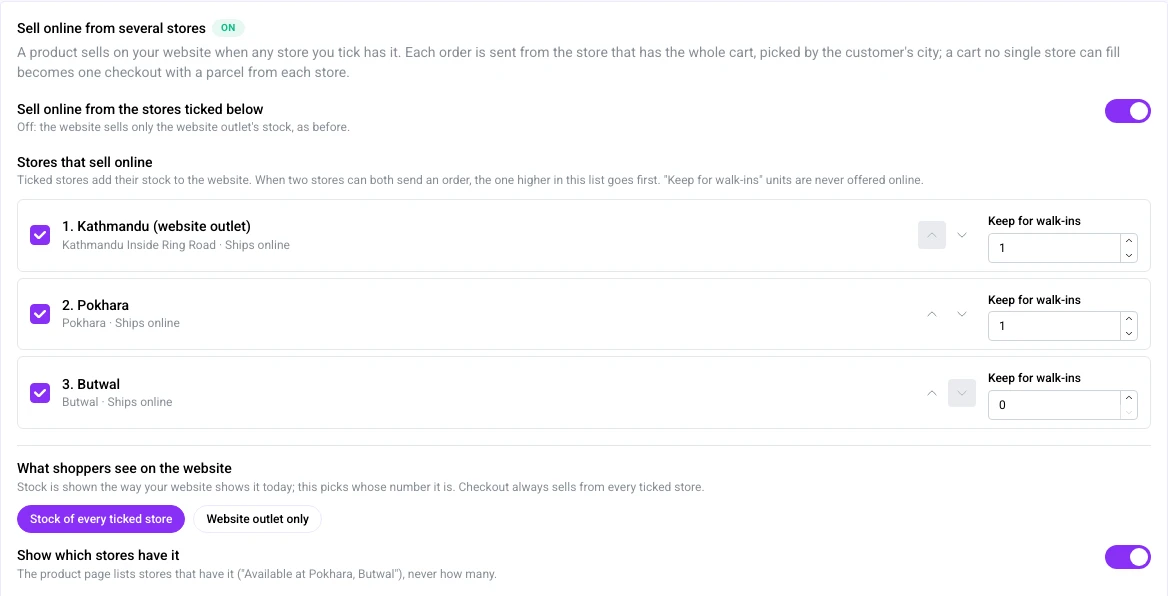
You decide which branches sell online and how much each keeps for walk-in customers. Blanxer does the rest at checkout.
One website stock, from the branches you choose.
Tick the branches that sell online. A product shows in stock on your website when any of them has it, so a single piece in Dhangadhi can still sell to a customer in Kathmandu.
Set “Keep for walk-ins” per branch and those units are never offered online, so the counter always has something to sell. The order of the list breaks ties when two branches can both send.
The nearest branch sends it.
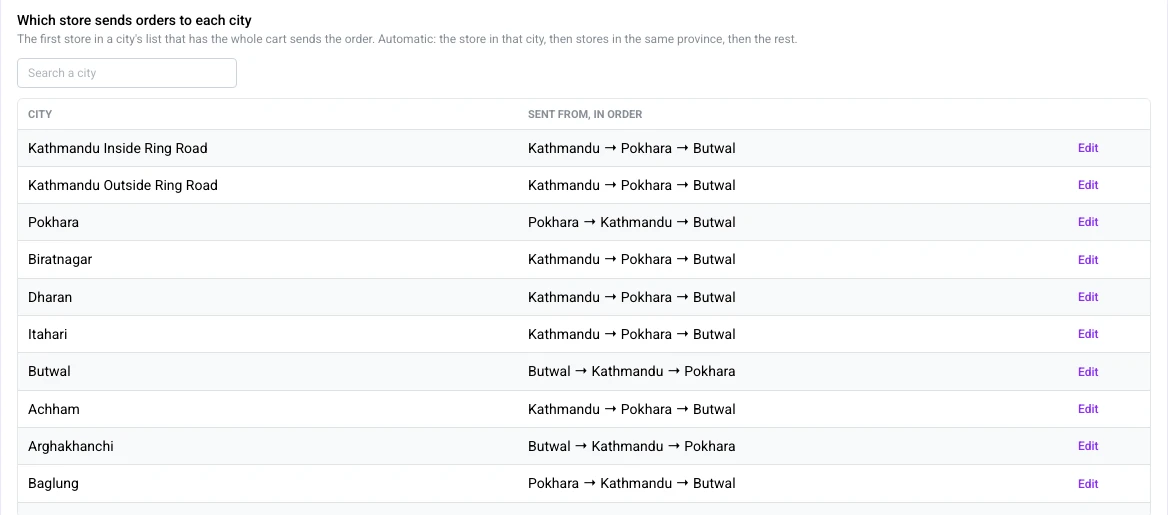
Each city has a list of branches in order. The first branch in the list that has the whole cart sends the order. Out of the box it is the branch in that city, then branches in the same province, then the rest.
Change any city with one click: send Chitwan orders from Butwal first, or keep a warehouse last. The customer pays the delivery charge from the branch that actually sends.
A cart no branch can fill arrives in parcels.
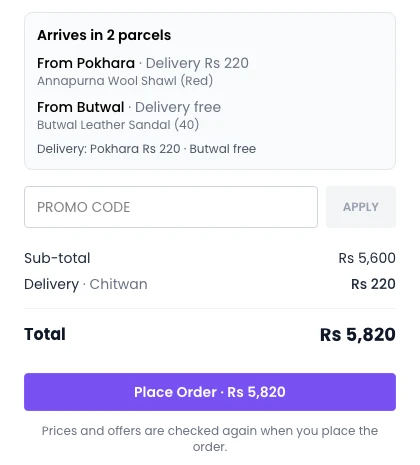
If the shawl is only in Pokhara and the sandals only in Butwal, the customer still checks out once and pays once. Checkout shows “Arrives in 2 parcels”, what comes from where and each parcel’s delivery charge.
Each parcel becomes its own order for the branch that packs it, linked to the others. The customer tracks every parcel from one page and can cancel one parcel or all of them.
Customers see which stores have it.
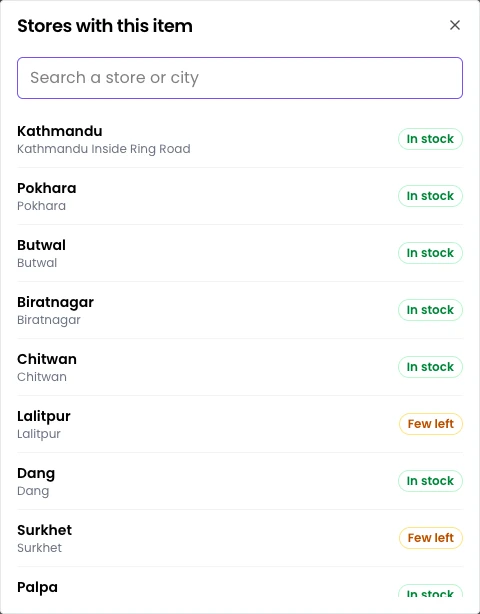
The product page can say “Available at Pokhara, Butwal +7 more” with a searchable list of stores, so a customer can also walk in. It shows in stock or few left, never how many you have.
Prefer to show only the website outlet’s number? That is one setting; checkout still sells from every ticked branch.
Every branch team knows what to pack.
Franchise or your own stores, each branch works in the same Blanxer account with only what it needs.
Orders, filtered to the branch.
Branch managers see the orders their branch sends, with a “To pack” list and a filter for each branch. Staff roles decide which branches a person can work in and what they can do there.
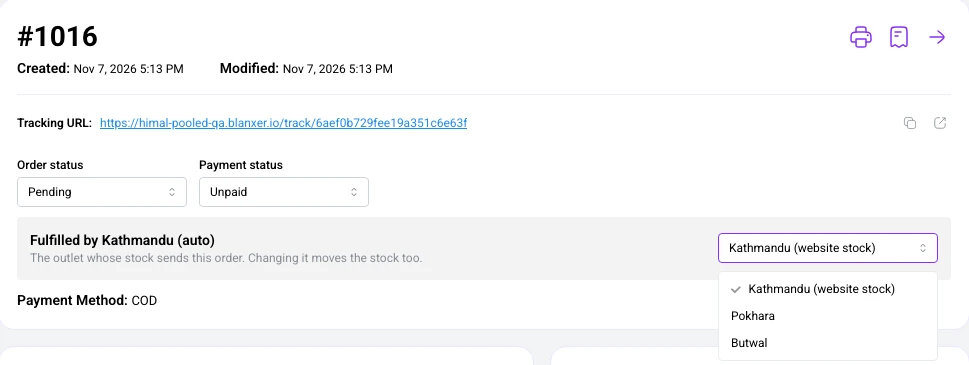
Head office can move any order to another branch with Fulfil from, and the stock moves with it. Store pickup orders stay with the store the customer chose.
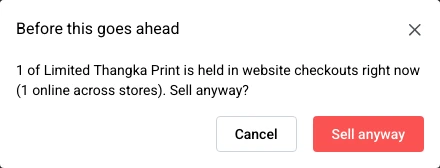
The counter never sells what a customer is paying for.
When the last piece on a shelf is in someone’s checkout online, the POS at that branch says so before the cashier sells it. The cashier can still sell it, knowingly.
Every unit a branch sends for a website order shows in its stock movements as fulfilled for online, so stock counts add up.
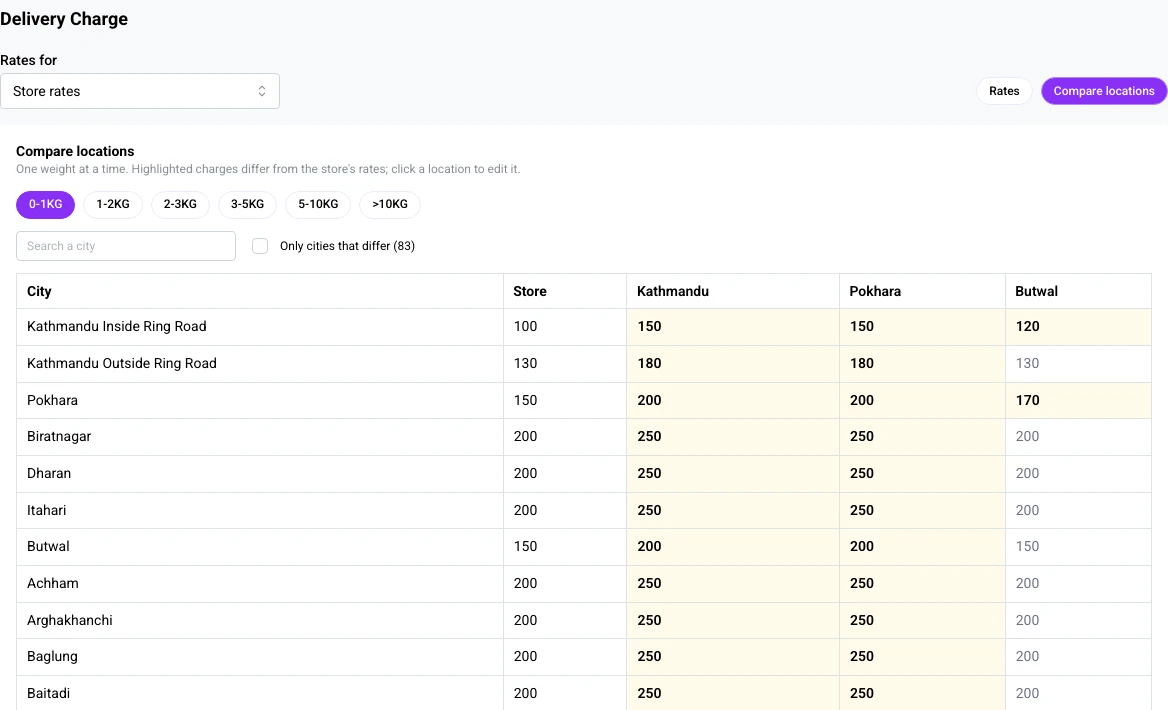
Delivery charges per branch.
Sending from Pokhara costs differently from sending from Kathmandu. Each branch can use the store’s rates, the store’s rates plus a fixed amount or a percentage, its own rates, or free delivery.
All of it is on the same Delivery charge page: pick a branch, copy rates from another, apply them to many at once, and compare every branch side by side. A parcelled checkout pays one charge per sending branch, and the charge the customer sees is the charge they pay.
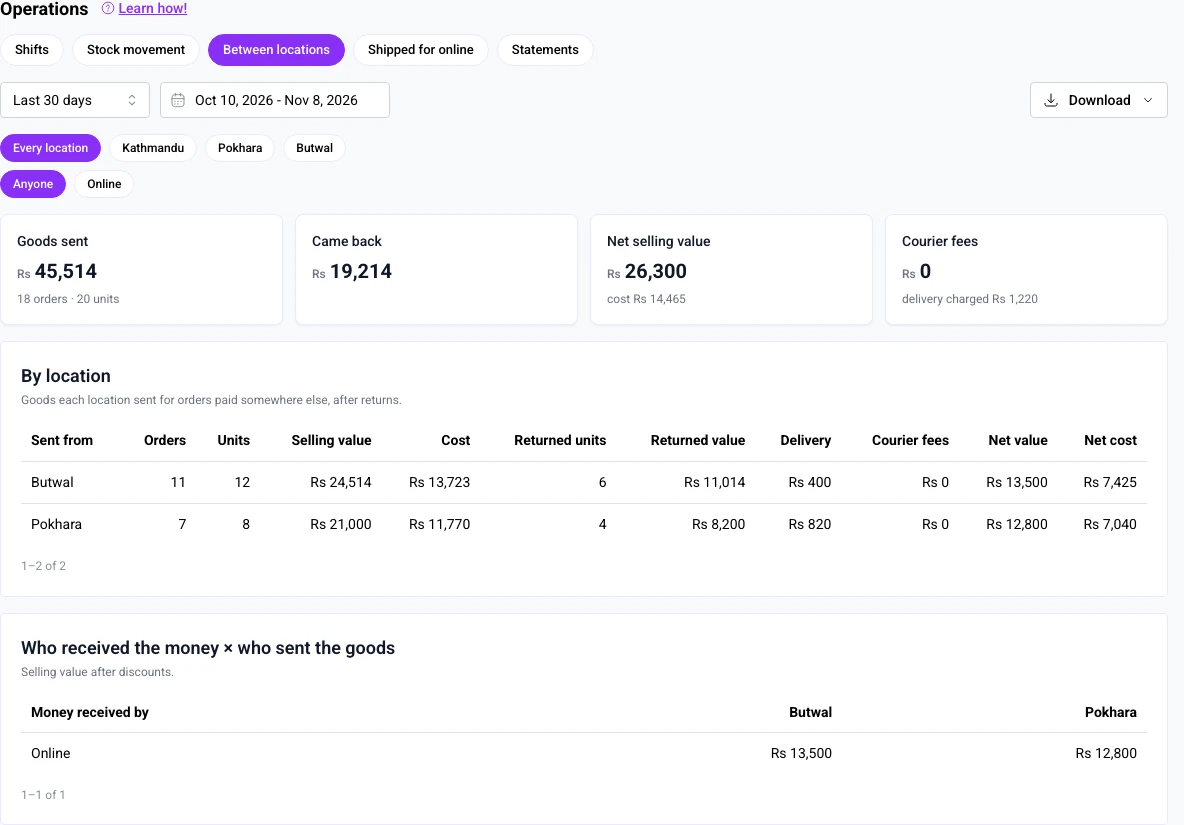
Who received the money, and who sent the goods.
A website order is paid online, but a branch gave up the stock. Blanxer keeps both sides so you can credit, pay or settle every branch.
Paid once, shared fairly
One online payment covers every parcel of a checkout. Discounts, coupons and advance payments are worked out once on the whole cart, then shared across the parcels, so each branch’s order carries its own share of the money and its own delivery charge. Cash on delivery is collected per parcel.
The Between locations report
Analytics → Operations → Between locations lists every order a branch sent for money received somewhere else, with selling value, cost, delivery and courier fees. Returns, cancellations and moved orders appear as reversals, so the net is always right. Filter by branch and download it as a spreadsheet.
Shipped for online, per branch
The Shipped for online tab shows what each branch packed for the website, order by order, so a busy branch that packs for online is not judged on its counter sales alone.
Settle your way
Franchisees and company-owned branches are paid differently. Blanxer does not move money between branches; it gives you the record, branch by branch, to settle by commission, cost plus margin or simple transfer.
Set up with you, branch by branch.
Included in Elite and Blanxer Enterprise custom plans. Our team sets each branch's city and couriers, the city routing and the delivery rates with you, checks the stock counts, then switches it on.
Where it works today
Blanxer websites and the Blanxer dashboard, including Create Order and the POS. The Blanxer app follows.
Which plan
Included in Elite within its location limit. For 10, 20 or 30 branches, it comes with a Blanxer Enterprise custom plan.
Good to know
Branches need internet to bill. Blanxer splits a cart into parcels rather than moving stock between branches first.
Already on Blanxer with a few outlets? Branch stock, transfers and staff roles are in Blanxer for physical stores.
Questions multi-branch brands ask us
Can a brand with 10, 20 or 30 branches across Nepal run on Blanxer?
Yes. Every branch and warehouse is an outlet in one Blanxer account, with its own stock, POS counters and staff. The website can sell the stock of every branch you choose, and each order is sent from the branch that has it, picked by the customer's city. It is included in the Elite plan within its location limit; for more branches, such as 10, 20 or 30, it comes with a Blanxer Enterprise custom plan.
Which branch sends a website order?
Each city has a list of branches in order. The first branch in the list that has the whole cart sends it. Out of the box that is the branch in the customer's city, then branches in the same province, then the rest, and you can change the order for any city. Head office can still move an order to another branch with Fulfil from.
What if no single branch has everything in the cart?
The customer still checks out once and pays once. Checkout shows that the order arrives in parcels, what comes from which branch and each parcel's delivery charge. Each parcel becomes its own order for the branch that packs it, linked to the others, and the customer can track or cancel each parcel.
How do delivery charges work with many branches?
Each branch uses the store's delivery rates, the store's rates plus a fixed amount or a percentage, its own rates, or free delivery. A checkout split into parcels pays one charge per sending branch. All of it is set on one Delivery charge page, with copy, apply-to-many and a side-by-side compare view.
How do we know which branch earned what from online orders?
The Between locations report (Analytics → Operations) lists every order a branch sent for money received somewhere else, with selling value, cost, delivery and courier fees, and reversals for returns, cancellations and moved orders. A table shows who received the money against who sent the goods, and it downloads as a spreadsheet. Discounts, coupons and advance payments are shared across the parcels of a checkout.
Does it work for franchises?
Yes. Each franchise branch works in the same Blanxer account with staff who only see their own outlets. Blanxer does not move money between branches; the Between locations report gives you the record to settle each franchisee your own way, by commission, cost plus margin or transfer.
Will the counter sell a piece a website customer is paying for?
Not without warning. Each branch can keep units for walk-ins that are never offered online, and when the last piece is in someone's online checkout, the POS asks the cashier before selling it.
Which plan includes multi-branch selling?
The Elite plan, within its location limit (typically 3 to 5 shops and warehouses, agreed on a call). Brands with more branches, such as 10, 20 or 30, get it with a Blanxer Enterprise custom plan, priced for their number of branches. It is not part of Premium, Business Plus or Platinum.
Where does multi-branch selling work today?
On Blanxer websites and in the Blanxer dashboard, including Create Order and the POS. Support in the Blanxer app follows. Branches need internet to bill.
See Blanxer with your own business in mind.
Book a demo. We'll show you the store, checkout, POS and dashboard, and tell you honestly which plan you need.
Prefer to talk directly?
Already a customer? Support on WhatsApp +977 9802344850, Sun–Fri, 9 AM – 6 PM.
Follow Blanxer
 A Blanxer product
One AI inbox for every customer conversation.
Sambad.io brings WhatsApp, Instagram, Facebook, website chat and email into one inbox. Connect your Blanxer store and its AI answers from your catalogue, checks stock, quotes delivery and places the order right in the chat.
- Website chat
- Gmail
- Outlook
- Zoho Mail